Whale AI
A horizontal AI layer across every module — 50+ use cases, able to run fully offline.
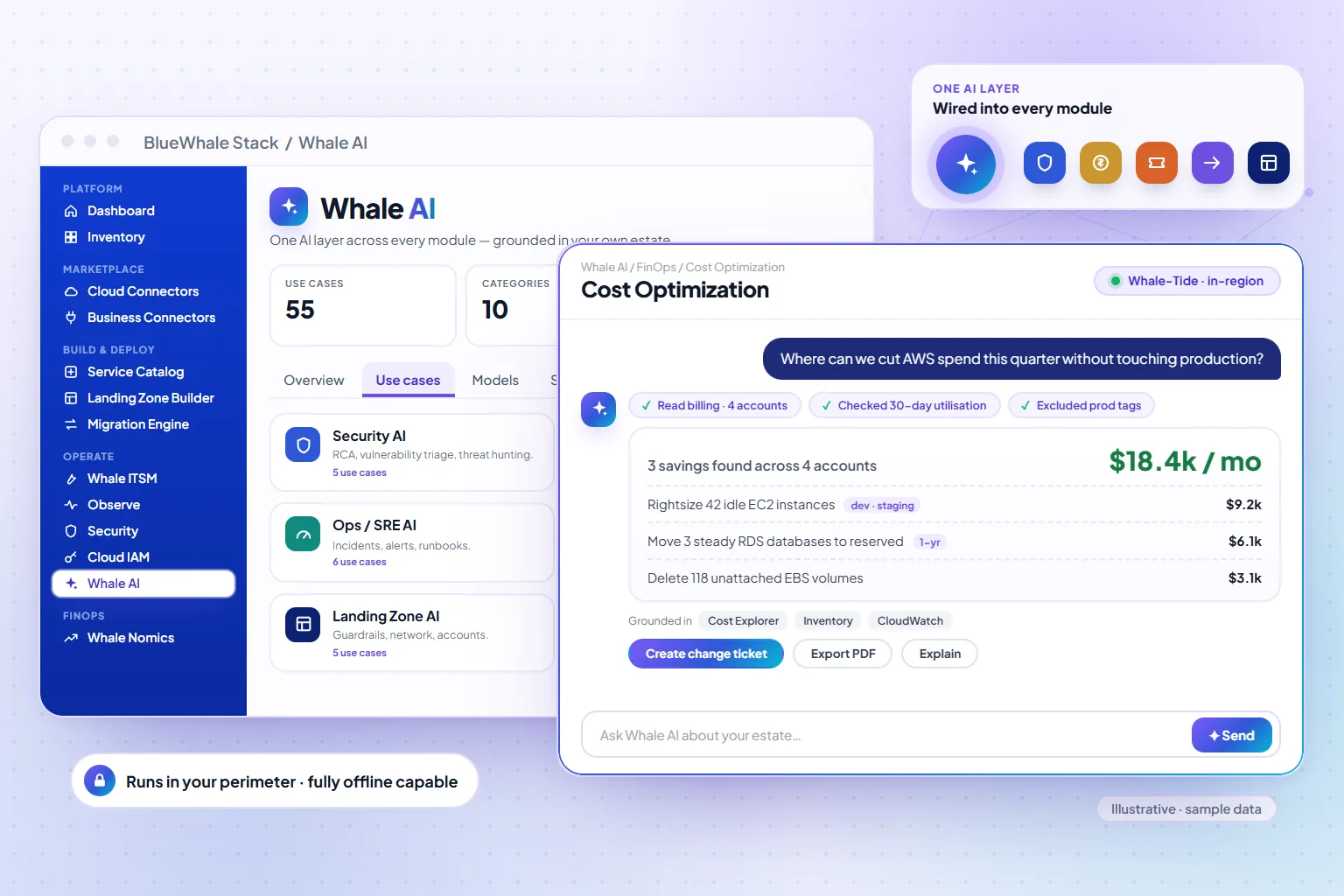
Whale AI is an intelligence layer woven into every module rather than a chatbot beside them: 50+ production use cases across cost, security, ITSM, operations, migration and governance, each grounded in your live inventory, billing, tickets and findings. It runs in three tiers — Spark, Tide and Abyss — with your choice of model, including fully offline inside the perimeter for sovereign estates.
- 50+
- Use cases, each with declared data dependencies
- Spark · Tide · Abyss
- Three tiers routed by task complexity
- Offline
- In-region and air-gapped models for sovereign deployments
Capabilities
What Whale AI does
Grounded, not generative guesswork
Every use case declares the providers it reads — inventory, cost, tickets, findings — and cites them in the answer; numbers come from the platform, not the model.
Tiered intelligence
Spark answers interactive questions in under three seconds; Tide reasons over migration plans and IaC; Abyss runs multi-step agents for the hardest cross-module work.
In the flow of work
An assistant drawer in every module, streamed answers, exports to PDF and Excel, and prompt caching so repeat questions are instant.
Inside the perimeter
Bring your model or run ours in-region; sovereign deployments run Whale AI fully offline with zero external data exposure.
Intelligence Tiers
Right model for every task
Whale AI automatically routes each use case to the appropriate tier — balancing depth of reasoning with response speed and cost.
Whale-Spark
FastInstant answers for interactive, conversational use
- Ask Whale drawer — context-aware per resource
- Quick resource summaries and state checks
- Tag compliance spot-checks
- Runbook lookups and step-by-step guidance
- Alert explanation and next-action suggestion
- Dashboard metric interpretation
Whale-Tide
BalancedThe daily workhorse for operational intelligence
- Cost optimization recommendations per account
- Capacity planning and right-sizing analysis
- Incident triage and prioritization guidance
- IaC template review and security checks
- Multi-cloud resource inventory analysis
- Change request risk assessment
Whale-Abyss
FlagshipFor the hardest problems that require multi-step analysis
- Executive monthly cost narratives with trend analysis
- Security root cause analysis across multi-cloud
- Architecture review and risk assessment
- Complex incident post-mortem generation
- Compliance gap analysis against frameworks
- Business case generation for cloud investment
Use Case Catalog
50+ production-ready use cases
Every use case ships with a hardened system prompt, declared data dependencies, pre-configured intelligence tier, and grounding providers — ready to use from day one.
Featured FinOps
- Executive Monthly Cost Report
- Cost Optimization Recommendations
- Spend Narrative Generator
- Anomaly Explanation & Root Cause
- Budget Forecast & Variance Analysis
Featured Security
- Security RCA — Root Cause Analysis
- Compliance Gap Assessment
- IAM Posture Review
- Network Exposure Analysis
- Remediation Playbook Generator
Featured ITSM
- Incident RCA Generator
- Change Risk Assessor
- Post-Mortem Writer
- Smart Ticket Classifier
- Runbook Auto-Generator
How it works
3 steps, from first connection to steady state
Ask, in context
From any screen, ask about what you are looking at — a workload, a bill, an incident.
Ground
The use case gathers the live facts it declares, scoped to your permissions.
Answer with citations
The right tier reasons over the facts and streams an answer with the evidence behind it.
Compared by category
Whale AI against the three usual alternatives
A general-purpose assistant, an APM vendor's AI and an ITSM vendor's AI each ground in one slice of the estate. The comparison is by category, based on public documentation as of September 2026.
| Capability | Whale AI | General-purpose assistant | APM-native AI | ITSM-native AI |
|---|---|---|---|---|
| Grounded in live cost data | Real-time | Training cutoff | ⊘ APM only | |
| Native platform integration | All modules | External | ⊘ APM only | ⊘ ITSM only |
| Multi-cloud inventory awareness | 6 clouds + on-prem | ⊘ Limited | ||
| Streaming token-by-token | ||||
| Exportable reports (PDF / Excel) | Built-in | Manual | ⊘ Dashboard | ⊘ ITSM only |
| Usage metering & spend caps | Per-tenant | |||
| FinOps-specific use cases | 12 use cases | ⊘ Generic |
Where it fits
One module of one platform
Shared platform
Capabilities
- Grounded in your live inventory, billing and tickets
- Tiers: Spark · Tide · Abyss
- Hosted model or your own
- In-region models for sovereign deployments
Included in
Solutions that use it
Industries that rely on it
Questions
Questions teams ask before turning it on
Scope, permissions and maturity — answered the way we answer them in an evaluation.
01Does our data leave our environment?
On SaaS, requests are processed in your chosen region; on BYOC they run in your accounts; on sovereign deployments Whale AI runs fully offline on in-region models with no external calls.
02Which models are used?
Your choice — hosted models including Anthropic Claude, or models you bring and run inside the perimeter. Use cases are model-agnostic; grounding and citations work the same way.
03Can it take actions?
Use cases draft plans, reports and configurations; actions still go through the platform's approvals and audit trail, so Whale AI never bypasses governance.
See it on your data
Whale AI, on your own estate — in one working session.
Bring one cloud account or one on-prem site. We connect it read-only during the call, walk the module on your real resources, and leave you with the export.