One Platform. Every Industry. Every Estate.
BlueWhale Stack is one control plane over six public clouds, your virtualization estate and your air-gapped sites. It is run by enterprises, by telco and datacenter operators who sell governed services on it, and by governments that must prove where data lives and who touched it. After connecting, every estate reports into one inventory, one identity fabric and one policy engine — and the audit evidence is generated continuously instead of assembled per inspection.
54 capabilities in nine families, four editions on one architecture, five deployment modes down to fully air-gapped.
Half a day · your technology and finance leads · success criteria agreed
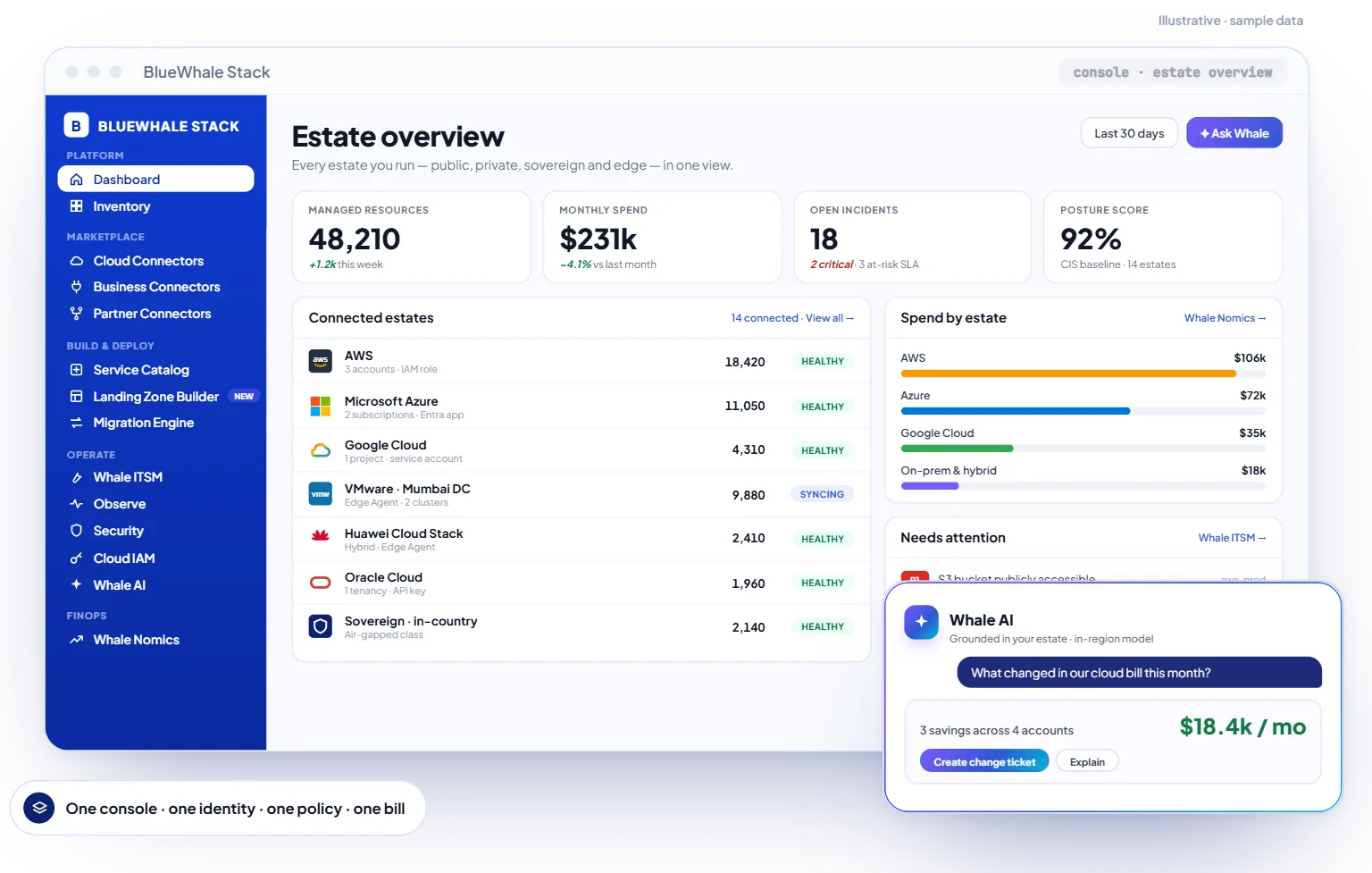
< 15 min
From connecting a cloud account to its first full inventory
6 + 5
Public clouds by API; private platforms by Edge Agent
0
Identity providers federated over SAML 2.0 / OIDC
0
Deployment modes — SaaS, BYOC, on-prem, air-gapped, edge
Who it is for
Three kinds of estate. One platform.
Enterprises, operators and governments consume governed services — each through its own edition of the same platform.
Why now: Most organisations add a new estate every year — a second cloud, an edge site, a sovereign region — and governance is added afterwards, per estate. BlueWhale Stack makes governance the layer a new estate joins on day one.
What it replaces
Seven tool categories, one licence
The consolidation arithmetic, tool by tool — with the honest status of each replacement, so you can plan which contracts retire this year and which next.
Cloud management platform (CMP)
Inventory & Discovery, Service Catalog and Cloud Connectors — one inventory across six clouds and on-prem, governed provisioning on top
GACloud cost tool
Whalenomics — billing joined to inventory, anomalies explained by Whale AI, rightsizing and commitment advice
AI use cases live · backend in progressObservability contract
Observe — logs, metrics, traces, SLOs with burn-rate alerts, synthetics, included in the licence
GAITSM for cloud operations
ITSM with P0–P4 SLAs, CMDB fed by discovery — or two-way sync with the ServiceNow or Jira you keep
GAIaC and landing-zone tooling
Landing Zone Builder (Control Tower, CLZ, GCP foundations)
BetaMigration assessment suite
Migration Engine — auto-classification, 6R scoring, dependency-aware waves with rollback
Assessment live · execution in progressCompliance evidence spreadsheets
Cloud Audit & Evidence — controls monitored continuously, reports per regime on demand
Enterprise & up
Platform architecture
The architecture, top to bottom
The platform in one picture — read top-down, the way value flows: from the industries served, through the Digital Experience Layer and the Unified Platform Core, down to the integrations, every estate, and the modes it deploys in.
- 01
Industry segments
Enterprise · Datacenter · Telco · Government · SMB
- 02
Digital Experience Layer
White-label portals · catalog & marketplace · self-service · per-tenant metering · SLA
- 03
Unified Platform Core
Nine capability families · 54 capabilities · one console, one identity, one policy, one bill
- 04
Integrations
OSS/BSS · ServiceNow · Jira · billing & invoicing · identity & SSO · API
- 05
Every estate
Six public clouds · private & virtualization · hybrid & sovereign stacks · air-gapped · edge
- 06
Deployment modes
SaaS · BYOC · on-premise · sovereign air-gapped · edge
The nine capability families
What lives in the platform core
Nine families under one console, one identity, one policy and one bill — 54 capabilities in all. Every family reads from and writes to the same inventory, identity and policy plane.
Full capability list (54 capabilities with edition mapping) available in the technical datasheet on request.
How the families work together — three everyday moments
A new estate lands
Migration & Discovery inventories it within minutes; Security & Identity extends the identity fabric to it; Governance applies the existing policy set; Whalenomics baselines its cost. It is governed from the first sync.
The auditor calls
Governance & Audit has been evaluating controls continuously across every estate, so the request becomes report parameters — regime, period, scope — and the evidence pack is generated in minutes.
AI, inside the walls
Whale AI reads operations and documentation on the customer's own model, inside the perimeter — with Observability watching it and the audit log recording it.
AI in every family — including inside the perimeter
Whale AI is a horizontal layer across the whole platform — AI for operations, documentation and compliance, grounded in your live data, with 50+ ready use cases. Your choice of model, able to run fully offline inside the perimeter.
Entry, fast — summaries, inventory Q&A and sizing recommendations in natural language.
Deep reasoning for migration planning, IaC drafting and multi-cloud analysis.
Premium multi-step agents for the most complex, cross-module workflows — including fully offline inside the perimeter.
See the product
The console, by job
Six of the screens teams live in, recomposed from the real console with sample data. Each opens its module — what it does, how it works and where it ships.
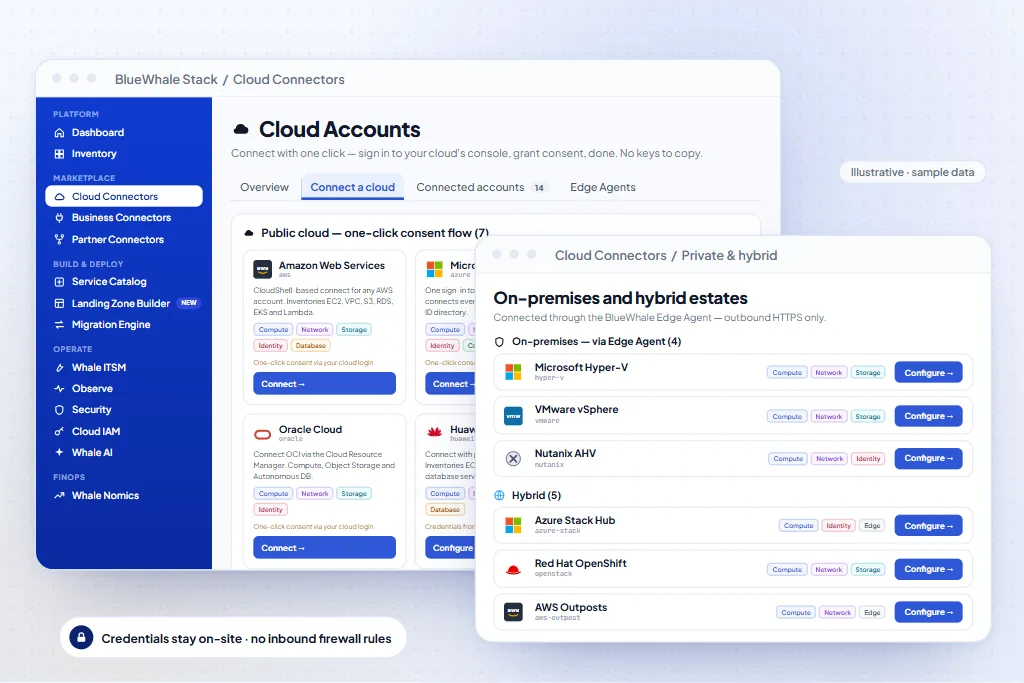
Cloud Connectors
One control plane over six public clouds, plus private, hybrid & edge.
Deployment
The same product, wherever it must run
Five deployment modes on one platform build — moving between them is an operational decision, not a re-implementation.
SaaS
First account connected and inventoried in under 15 minutes. Your data stays in the region you choose — Singapore, Mumbai, Dubai, Frankfurt or Los Angeles.
BYOC — your clouds
On your own cloud accounts — the control plane runs in your AWS / Azure / GCP; nothing is re-hosted to adopt it.
On-premise
Full control inside your own datacenters, on your virtualization or bare-metal estate.
Sovereign · air-gapped
Fully disconnected operation — including Whale AI offline, in-region models and no call-home.
Edge — offline-tolerant
Plants, branches and bureaus under headquarters-grade policy, tolerant of disconnection.
Every mode runs the same platform build, so moving between modes is an operational decision. Mixed estates are common: a SaaS console governing air-gapped and edge sites through the Edge Agent.
Support & service model
Who runs it with you after go-live
L1/L2 with you or your partner and L3 with BlueWhale, a 24×7 critical bridge at 99.9%, quarterly releases, and no forced upgrades on sovereign estates.
Tiered support
L1/L2 with the customer or partner, L3 with BlueWhale — 24×7 critical bridge at 99.9%.
Implementation
BlueWhale practices — App, Infrastructure and Data Modernization, AI Design — or certified partners.
Product & roadmap
Quarterly releases; customer councils feed the roadmap; no forced upgrades on sovereign estates.
The standing offer
The 90-day prototype
Proven before commitment. Half a day with your technology and finance leaders, then a full-featured prototype on your own estate — scored on agreed criteria before any licensing decision.
Half day
Discovery workshop
The platform on your estate's shape; success criteria agreed with technology and finance.
90 days · no licence cost
Prototype
Full-featured on your own estate: inventory live, cost decomposed, one audit report, one AI use case.
Day 90
Evidence review
Scored on the agreed criteria — then, and only then, the licensing decision.
Quarters 2–4
Scale
The control plane extends estate by estate; every environment inherits governance day one.
Next step — the discovery workshop.
Bring your hardest audit finding and your least explainable cloud bill; we will show what the platform does with both, on your estate's shape, before any commercial conversation.
Trust & Sovereignty
Certified, and proven before commitment
Built for regulated industries from the foundation up — independently certified management systems, and the compliance alignment engineered into the platform itself.
Five SaaS regions
Singapore, Mumbai, Dubai, Frankfurt and Los Angeles. Choose a region; your data stays in it.
Data residency
Residency enforced per resource and evidenced from the audit log — DPDP in Mumbai, GDPR in Frankfurt; any other regime by BYOC, on-prem or air-gapped deployment in-country.
Sovereign & air-gapped
SaaS, your own cloud (BYOC), on-premise, or fully sovereign with no call-home and in-region, offline AI.
Governed & audited
Identity, least-privilege access, and an immutable audit trail across every environment.
Security posture
- One identity fabric (SAML 2.0 / OIDC) across 10 identity providers, with SCIM auto-provisioning
- Least-privilege, role-based access across every connected estate; credentials AES-256 at rest, TLS 1.3 in transit
- Continuous control monitoring; the report your auditor asks for, generated per regime on demand
- Data residency by region (DPDP — Mumbai, GDPR — Frankfurt); in-country by BYOC, on-prem or air-gapped elsewhere
- ISO/IEC 27001, 27017, 27018, 27701 and ISO 22301 certified; SOC 2 Type II readiness assessment complete
- Air-gapped and in-region deployment for sovereign customers, with WORM-backed audit logs in the Government Edition
Compliance frameworks
Certified entity: BlueWhale Stack Consulting and Technologies FZE LLC. Certificates are verifiable through the Trust Center.
Questions
What buyers ask about the platform
Permissions, deployment modes, what is GA and what is not, and where Whale AI sends your data.
What do you need from us to start?
Read-only credentials for one cloud account — an IAM role, an Entra app registration or a Viewer service account — and, for on-prem, one Edge Agent per site with read access to the hypervisor. No inbound firewall rules, nothing on guest VMs.
SaaS, BYOC, on-prem or air-gapped — is it the same product?
Yes, one build. SaaS runs in Singapore, Mumbai, Dubai, Frankfurt or Los Angeles; BYOC runs the control plane in your own AWS, Azure or GCP; on-prem and air-gapped run inside your perimeter with signed offline updates. Moving between modes is an operational decision.
Which parts are generally available and which are not?
Inventory, Cloud Connectors, Identity, Service Catalog (AWS provisioning), Observe, ITSM, Whale AI and the Government Edition are GA. Landing Zone Builder is beta. The Migration Engine's assessment is live with execution hooks in progress; the Whalenomics backend is in progress with its Whale AI use cases live. Tenancy & Monetization is in preview for the Telco & Datacenter Edition, GA Q4 2026.
Does Whale AI send our data to a model provider?
Only on SaaS, in your region, if you choose a hosted model. BYOC and sovereign deployments run your own model or ours in-region; the Government Edition runs Whale AI fully offline with zero external calls.
How does it fit with ServiceNow, Jira and our SIEM?
Tickets sync two-way with ServiceNow and Jira; Observe forwards telemetry and findings to your SIEM; the REST API and webhooks expose everything the console does.
What does an evaluation look like?
A half-day discovery workshop, then a 90-day prototype on your own estate with no licence cost — inventory live, cost decomposed, one audit report, one AI use case — scored on criteria agreed up front.
Next step
See the platform on one of your own accounts.
A 45-minute working session with a solutions engineer: one cloud account connected read-only, the inventory, cost and audit screens on your real resources, and the export left with you. Bring your hardest audit finding.