Cloud Audit & Evidence
11 compliance frameworks, scored from live scans.
Cloud Audit & Evidence scores your AWS, Azure, Google Cloud and Oracle accounts against 11 built-in frameworks — the CIS benchmarks, PCI DSS v4.0, SOC 2, ISO/IEC 27001:2022, HIPAA, NIST SP 800-53, FedRAMP Moderate and GDPR — every time a scan runs. Failing checks become findings with an owner, manual controls count once attested, and the audit-ready export comes from the same record.
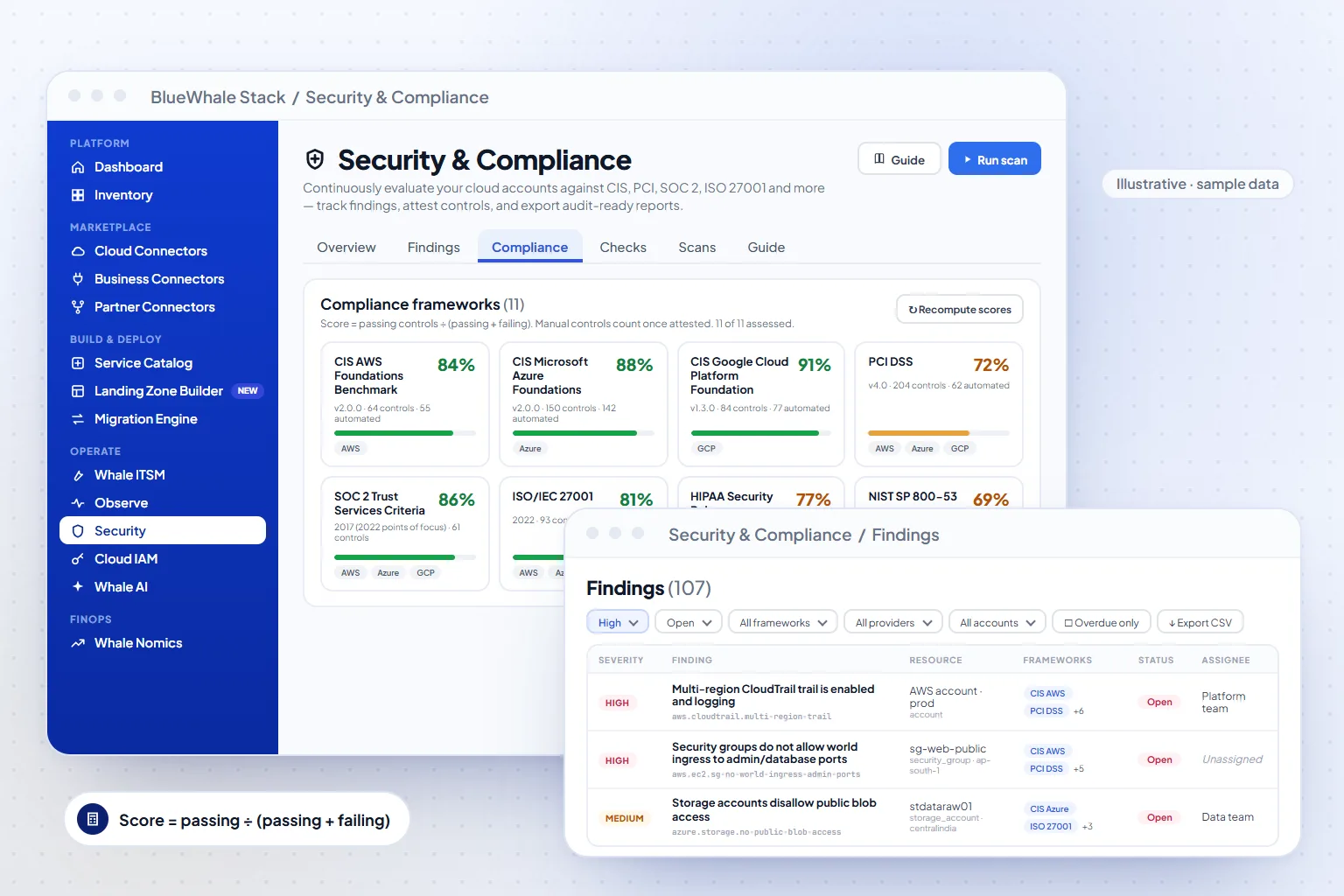
- 11 frameworks
- CIS · PCI DSS · SOC 2 · ISO 27001 · HIPAA · NIST · FedRAMP · GDPR
- Scored per scan
- Passing ÷ (passing + failing) — the formula is on the screen
- Audit-ready
- Findings and evidence exported for the auditor, CSV included
Capabilities
What Cloud Audit & Evidence does
Built-in frameworks
CIS AWS v2.0.0, CIS Azure v2.0.0, CIS Google Cloud v1.3.0 and CIS Oracle Cloud, PCI DSS v4.0, SOC 2, ISO/IEC 27001:2022, HIPAA Security Rule, NIST SP 800-53 Rev. 5, FedRAMP Moderate and GDPR — each with its controls and how many are automated.
Scans that score every control
Run a scan and each automated check — a multi-region CloudTrail trail, no world ingress to admin or database ports — is evaluated against the live accounts. Scores recompute as passing ÷ (passing + failing).
Findings with owners
Every failing check is a finding with severity, resource, account, the frameworks it affects, status, assignee and last seen — filtered by severity, framework, provider, account, assignee or overdue.
Attestation and audit-ready export
Manual controls are attested with evidence and count once attested. Findings export to CSV with your filters applied, and the report the auditor asks for is generated from the same record.
How it works
3 steps, from first connection to steady state
Scan
Run a scan across the connected AWS, Azure, Google Cloud and Oracle accounts; every automated check is evaluated against live configuration.
Score
Each framework is scored as passing ÷ (passing + failing); manual controls count once attested, and a framework shows “not assessed” until its first scan.
Fix & export
Assign findings, track them to closed, and export findings and audit-ready reports for the period the auditor asks about.
Where it fits
One module of one platform
Shared platform
Capabilities
- 11 frameworks: CIS · PCI DSS v4.0 · SOC 2 · ISO 27001 · HIPAA · NIST · FedRAMP · GDPR
- Scores from live scans — passing ÷ (passing + failing)
- Findings with severity, owner and the frameworks they affect
- Manual controls attested; findings and reports exported for audit
Included in
Solutions that use it
Industries that rely on it
Questions
Questions teams ask before turning it on
Scope, permissions and maturity — answered the way we answer them in an evaluation.
01Which frameworks are built in?
Eleven: CIS AWS Foundations v2.0.0, CIS Microsoft Azure Foundations v2.0.0, CIS Google Cloud Platform Foundation v1.3.0, CIS Oracle Cloud Infrastructure Foundations, PCI DSS v4.0, SOC 2 Trust Services Criteria (2017, 2022 points of focus), ISO/IEC 27001:2022, the HIPAA Security Rule, NIST SP 800-53 Rev. 5, the FedRAMP Moderate baseline and GDPR technical & organisational measures. Regional regimes such as India DPDP, RBI outsourcing directions, CERT-In and SEBI CSCRF are mapped onto the same controls as part of an engagement.
02How is a framework's score calculated?
Passing controls ÷ (passing + failing). Controls that need a person — a policy document, a review — count once they are attested, and a framework shows “not assessed” until a scan has run against it.
03Can we hand the results to an auditor?
Yes. Findings export to CSV with your filters applied, reports are generated from the same record, and every action is written to the append-only audit log — backed by WORM storage on the Government Edition.
See it on your data
Cloud Audit & Evidence, on your own estate — in one working session.
Bring one cloud account or one on-prem site. We connect it read-only during the call, walk the module on your real resources, and leave you with the export.